Graphics / Reference / Bresenham with floating-point endpoints
Bresenham with floating-point endpoints
Bresenham can be extended to non-integer endpoints by rounding the starting x column, evaluating the actual line height there, and initialising the scaled error from that intersection rather than assuming zero error.
For floating-point endpoints, the simple integer-endpoint initialisation yf = 0 is not valid because the rounded first raster column may not pass through the geometric endpoint itself.
Initialise:
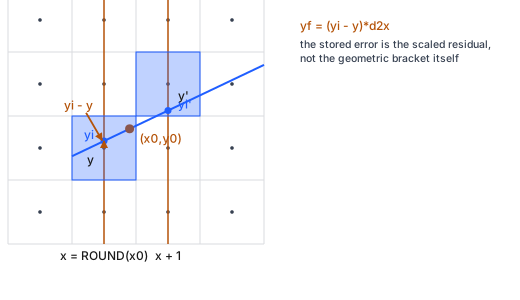
dx = x1 - x0 d2x = dx + dx d2y = 2*(y1 - y0) x = ROUND(x0) m = (y1 - y0)/(x1 - x0) yi = y0 + m*(x - x0) y = ROUND(yi) yf = (yi - y)*d2x
Then iterate while x <= ROUND(x1):
DRAW(x,y) x = x + 1 yf = yf + d2y if yf > dx: y = y + 1 yf = yf - d2x
The starting y must be obtained from yi evaluated at the rounded starting x. Rounding x0 and y0 independently is not generally equivalent and can choose the wrong starting pixel.
For the ROUND operations used to select raster columns and the initial row, this site uses the earlier half-up convention. That is separate from Bresenham's internal decision tie: the loop comparison remains strictly yf > dx, so an exact decision-boundary tie stays on the current row.
For this form, dx, d2x, d2y, m, yi and yf are floating-point values. Only x and y are integers, and the loop bound is ROUND(x1).
The standard diagram shows the endpoint (x0,y0) inside a pixel, the line intersection yi at the rounded column x, and the corresponding selected row plus residual error before advancing to the next column.
Builds on
Read
- Read the chapter: Bresenham with floating-point endpoints